> ## Documentation Index
> Fetch the complete documentation index at: https://docs.nora.my/llms.txt
> Use this file to discover all available pages before exploring further.
# New experiment
> Select a cluster, configure options, launch. Three steps and it runs
Experiments start in two places: **New experiment** at the top right of Simulation, or **Run simulation** on a cluster's detail page. Either way the same drawer opens, and after three steps the experiment runs in the background.
 "Which cluster should we fix?" Pick a cluster from the list. Each row carries its category tag and signal count, and **Search clusters** narrows it down. If you came from a cluster's detail page, this step is already filled in.
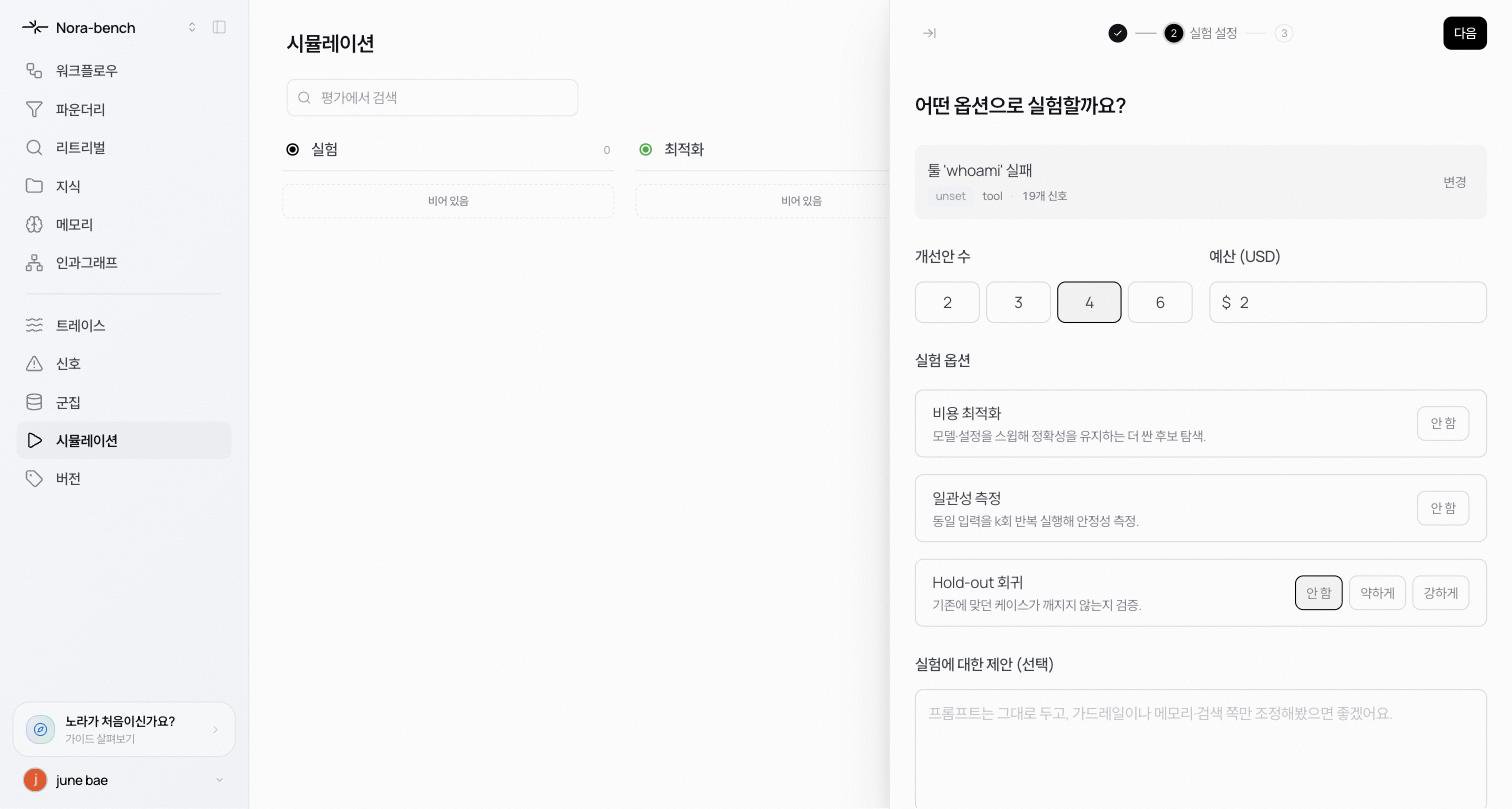
"Which options should we use?"
* **Candidates** 2, 3, 4, or 6. The default is 4.
* **Budget (USD)** the spending cap for the experiment. The default is \$2.
* **Experiment options**
* **Cost optimization** sweeps models and config for a cheaper candidate that keeps accuracy.
* **Consistency** replays each input k times and measures stability. Turning it on lets you set k (default 3).
* **Hold-out regression** guards previously-correct cases against regression. Choose Off, Light, or Full.
* **Suggestions for this experiment (optional)** free text to steer the direction. For example: "Keep the prompt as-is and try improving it by tweaking guardrails, memory, or retrieval instead."
* **More options → Reference folders (optional)** pick folders to score candidates against a hand-built golden set. If you pick none, the cluster's own cases are used.
"Shall we start?" The cluster, category, candidates, budget, holdout, and instructions are summarized. Press **Start experiment**.
## While it runs
The experiment runs in the background. A measuring card appears in the board's **Experiment** column, and opening it shows candidates being built in real time (see [Experiment results](/reliable/simulation/results)). You can close the drawer and do something else.
## Learn more
Read the candidates and metrics the experiment produced.
What the Hold-out regression option does.
"Which cluster should we fix?" Pick a cluster from the list. Each row carries its category tag and signal count, and **Search clusters** narrows it down. If you came from a cluster's detail page, this step is already filled in.
"Which options should we use?"
* **Candidates** 2, 3, 4, or 6. The default is 4.
* **Budget (USD)** the spending cap for the experiment. The default is \$2.
* **Experiment options**
* **Cost optimization** sweeps models and config for a cheaper candidate that keeps accuracy.
* **Consistency** replays each input k times and measures stability. Turning it on lets you set k (default 3).
* **Hold-out regression** guards previously-correct cases against regression. Choose Off, Light, or Full.
* **Suggestions for this experiment (optional)** free text to steer the direction. For example: "Keep the prompt as-is and try improving it by tweaking guardrails, memory, or retrieval instead."
* **More options → Reference folders (optional)** pick folders to score candidates against a hand-built golden set. If you pick none, the cluster's own cases are used.
"Shall we start?" The cluster, category, candidates, budget, holdout, and instructions are summarized. Press **Start experiment**.
## While it runs
The experiment runs in the background. A measuring card appears in the board's **Experiment** column, and opening it shows candidates being built in real time (see [Experiment results](/reliable/simulation/results)). You can close the drawer and do something else.
## Learn more
Read the candidates and metrics the experiment produced.
What the Hold-out regression option does.