> ## Documentation Index
> Fetch the complete documentation index at: https://docs.nora.my/llms.txt
> Use this file to discover all available pages before exploring further.
# Experiment results
> Candidates, gains, spend, and the reasoning trace, all inside the experiment card
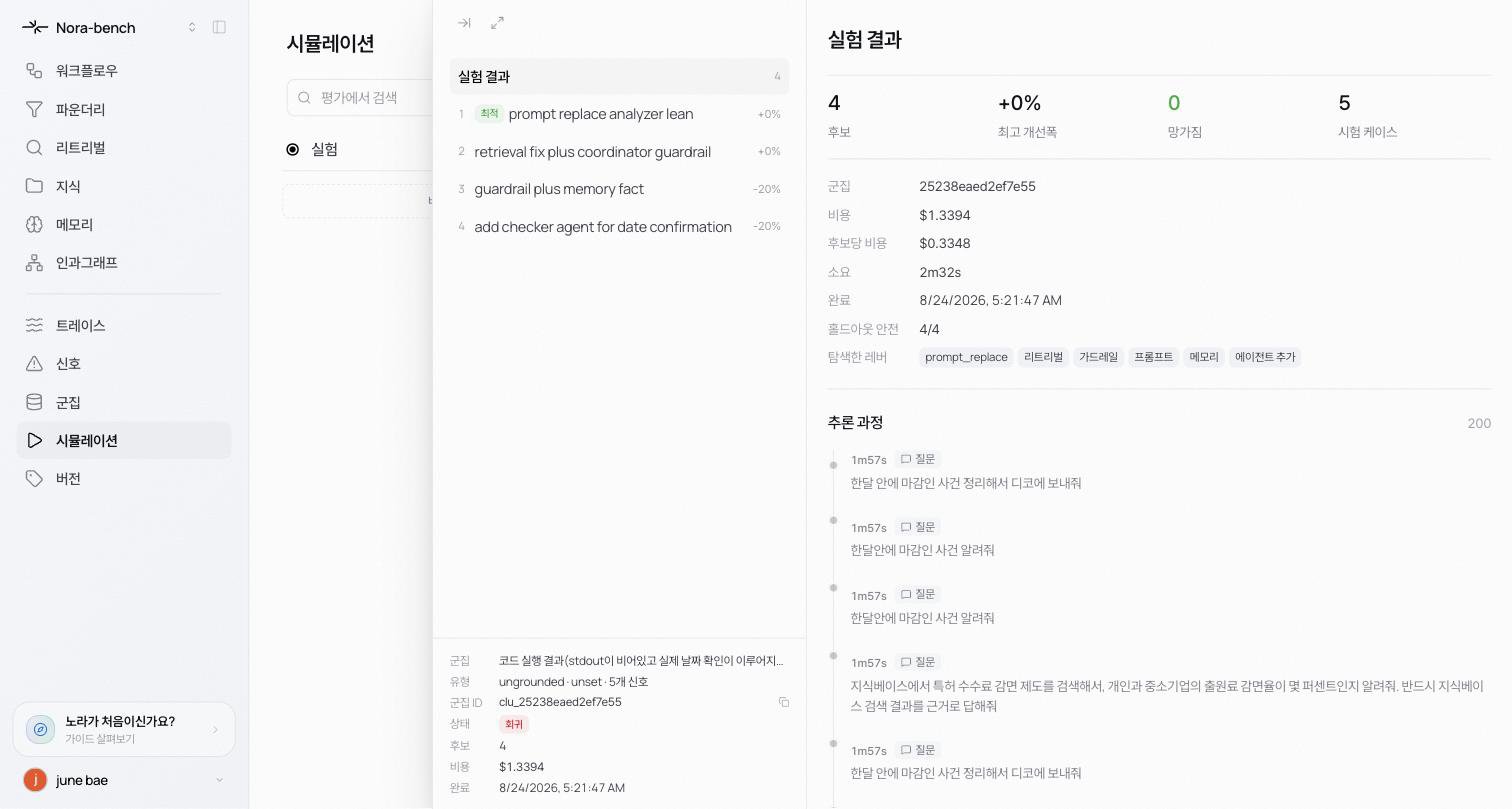
Click a card on the board to open the experiment's detail. The left side holds the candidate list and experiment metadata; the right side holds the results and the reasoning trace. The ⤢ at the top left expands it to a full page.
 ## Experiment results at a glance
Four numbers sit at the top.
* **Candidates** how many fix candidates were built
* **Best gain** the improvement of the best candidate
* **Broke** how many previously-working cases broke
* **Cases tested** how many cases were scored
Metadata follows.
* **Cluster**, **Spend**, **Cost / candidate**, **Duration**, and the completion time
* **Safe on holdout** N/N: cases protected when Hold-out regression was on
* **Surfaces** the places the experiment explored, shown as chips like prompt\_replace, retrieval, guardrail, prompt, memory, and add agent
## The candidate list
Each candidate shows its number, name, and gain, and the best one carries the **Best** badge. Click a candidate to open its detail (see [Verify and publish](/reliable/simulation/verify-deploy)).
## Reasoning trace
A timeline where the agent narrates the experiment. Stage badges for diagnosis (looking through the cluster's failures), plan (designing the candidates), and experiment n/N are followed by a time-ordered log of question, reasoning, reference, and answer entries as cases are replayed. It updates live while the experiment runs.
## When the experiment finishes
The card moves to the column the results call for: **Optimization** when an improvement is confirmed, **Regression** when regressions remain or no improvement was confirmed. Either way the candidates and the record stay put, so you can verify a candidate or re-run the experiment with different options.
## Learn more
Pick one candidate, deep-test it, publish it.
Re-run with different options.
## Experiment results at a glance
Four numbers sit at the top.
* **Candidates** how many fix candidates were built
* **Best gain** the improvement of the best candidate
* **Broke** how many previously-working cases broke
* **Cases tested** how many cases were scored
Metadata follows.
* **Cluster**, **Spend**, **Cost / candidate**, **Duration**, and the completion time
* **Safe on holdout** N/N: cases protected when Hold-out regression was on
* **Surfaces** the places the experiment explored, shown as chips like prompt\_replace, retrieval, guardrail, prompt, memory, and add agent
## The candidate list
Each candidate shows its number, name, and gain, and the best one carries the **Best** badge. Click a candidate to open its detail (see [Verify and publish](/reliable/simulation/verify-deploy)).
## Reasoning trace
A timeline where the agent narrates the experiment. Stage badges for diagnosis (looking through the cluster's failures), plan (designing the candidates), and experiment n/N are followed by a time-ordered log of question, reasoning, reference, and answer entries as cases are replayed. It updates live while the experiment runs.
## When the experiment finishes
The card moves to the column the results call for: **Optimization** when an improvement is confirmed, **Regression** when regressions remain or no improvement was confirmed. Either way the candidates and the record stay put, so you can verify a candidate or re-run the experiment with different options.
## Learn more
Pick one candidate, deep-test it, publish it.
Re-run with different options.