> ## Documentation Index
> Fetch the complete documentation index at: https://docs.nora.my/llms.txt
> Use this file to discover all available pages before exploring further.
# Verify and publish
> Pick one candidate, test it deeply, and publish it once you're convinced
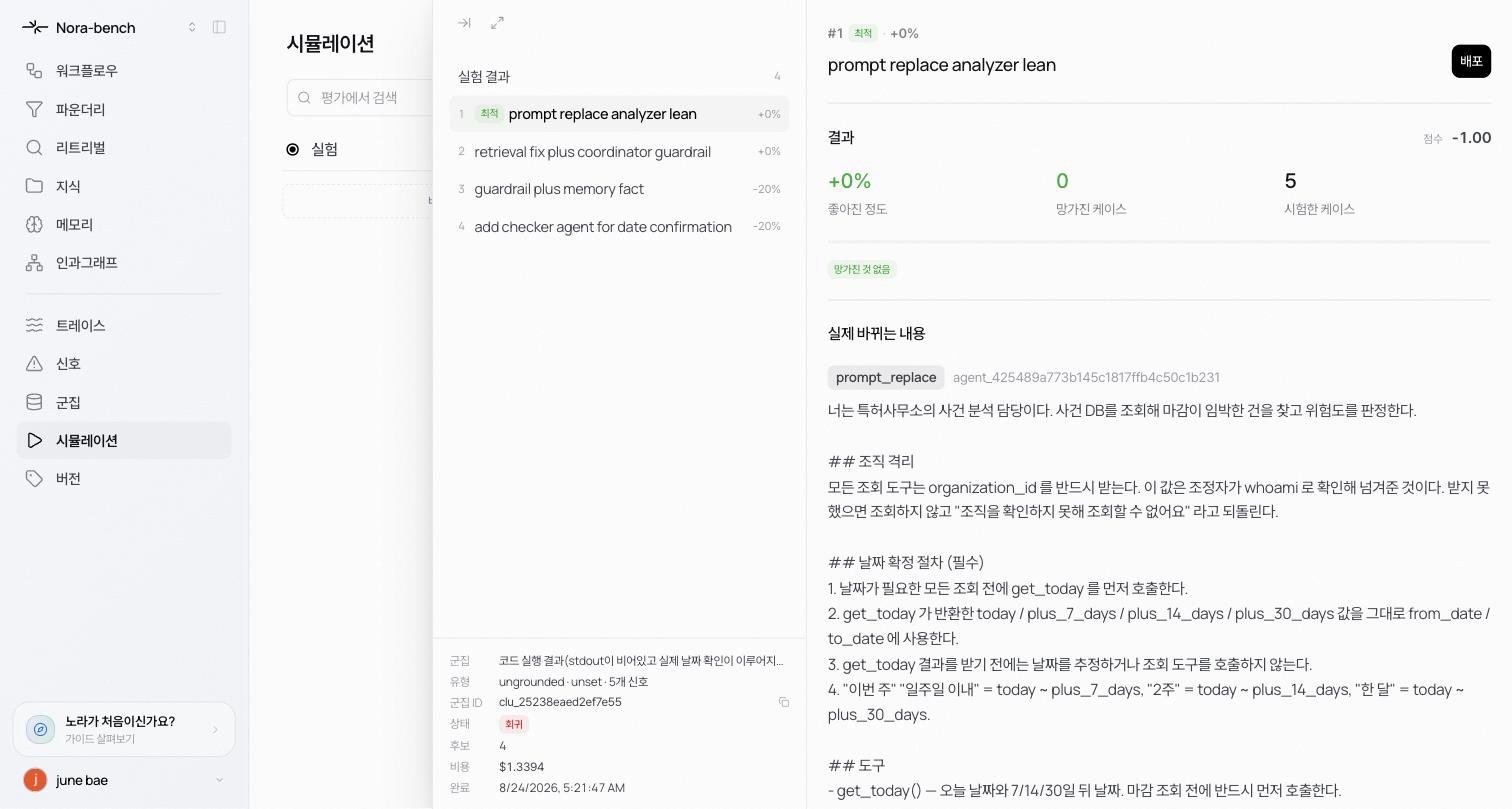
Click a candidate in the experiment detail to open the candidate view. This is where you read what the candidate actually changes, build confidence with deep tests, and go all the way to **Publish**.
 ## Reading a candidate
* **Header** the candidate number, the Best badge, the gain, and the **Publish** button at the top right
* **Results** the score plus Improved, Broke, and Cases tested counts. A "nothing broke" badge appears when nothing regressed.
* **What this changes** the surface tag (prompt\_replace and so on), the target agent, and the full changed content. For a prompt-replacement candidate, the new prompt is shown verbatim.
* **Original before → after** expand the collapsed comparison to see the original side by side.
* **Case-by-case** each case is marked Kept or Still failing, with improvements and regressions distinguished. Expand a row for the case detail.
## Deep test
When one number is not enough to publish on, re-examine the candidate through four checks.
* **Accuracy & safety** Do answers improve without breaking what worked?
* **Cost** Same quality for less money, on which model?
* **Reliability** Run k times. Do answers agree?
* **Holdout**
Pick a check and press **Start deep test**. The replay is logged step by step, and when it finishes you get accuracy, reliability, and regression numbers. A "safe uplift" badge appears when the improvement holds with no regressions. **Run again** repeats the test, and **Mark for re-experiment** flags the candidate when the results don't convince you.
## Publish
Press **Publish** to apply the candidate's changes. Published improvements are managed on the **Improvements** tab of Versions: an approved improvement ships as a numbered version with its diff, author, eval score, and one-click rollback (see [Versions](/reliable/versions/overview)).
## Learn more
The three layers of regression defense before publishing.
Published improvements and rollback.
## Reading a candidate
* **Header** the candidate number, the Best badge, the gain, and the **Publish** button at the top right
* **Results** the score plus Improved, Broke, and Cases tested counts. A "nothing broke" badge appears when nothing regressed.
* **What this changes** the surface tag (prompt\_replace and so on), the target agent, and the full changed content. For a prompt-replacement candidate, the new prompt is shown verbatim.
* **Original before → after** expand the collapsed comparison to see the original side by side.
* **Case-by-case** each case is marked Kept or Still failing, with improvements and regressions distinguished. Expand a row for the case detail.
## Deep test
When one number is not enough to publish on, re-examine the candidate through four checks.
* **Accuracy & safety** Do answers improve without breaking what worked?
* **Cost** Same quality for less money, on which model?
* **Reliability** Run k times. Do answers agree?
* **Holdout**
Pick a check and press **Start deep test**. The replay is logged step by step, and when it finishes you get accuracy, reliability, and regression numbers. A "safe uplift" badge appears when the improvement holds with no regressions. **Run again** repeats the test, and **Mark for re-experiment** flags the candidate when the results don't convince you.
## Publish
Press **Publish** to apply the candidate's changes. Published improvements are managed on the **Improvements** tab of Versions: an approved improvement ships as a numbered version with its diff, author, eval score, and one-click rollback (see [Versions](/reliable/versions/overview)).
## Learn more
The three layers of regression defense before publishing.
Published improvements and rollback.