

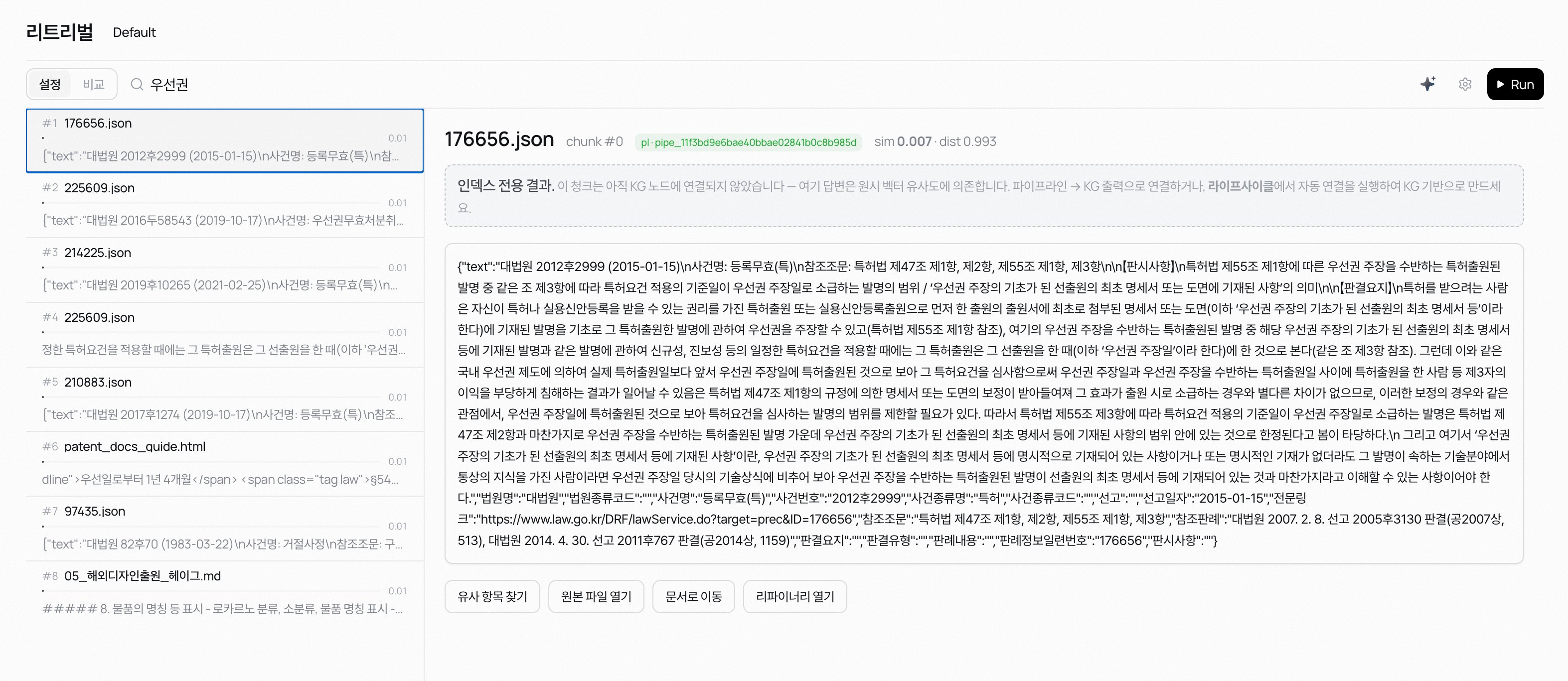
The retrieval page
The Retrieval page is where you tune and test in one place.- Type a query in the top search bar and hit [Run]. The left column lists results by score. Pick one and the right pane shows the full chunk, neighbouring chunks, and metadata.
- The AI polish (✦) button inside the search bar has a chat model rewrite the current query so it works better for retrieval. Requires a provider key in the workspace.
- The page title is the active preset’s name. Click the title to open the preset menu and switch to another preset or create a new one. Double-click to rename inline.
- The ⚙ icon on the right of the search bar opens the Retrieval settings dock. Every knob covered later on lives here.
- The Setup / Compare toggle switches modes. Setup mode tunes one preset at a time; Compare mode runs the same query across multiple presets side by side.
The steps a search goes through
Each query goes through these steps before the results come back:- Query: the Agent’s question. If HyDE is on, the model writes a hypothetical answer and searches with that instead.
- Search: the configured method (vector · keyword · hybrid · KG-rooted) gathers candidate chunks from knowledge.
- Ranking: each candidate’s vector and keyword scores are combined into a rank. Anything below the minimum-similarity threshold is filtered out here.
- Rerank (optional): if the reranker is on, the candidates are re-scored so more relevant chunks float higher.
- Causal reasoning (optional): if a causal graph is connected, chunks the graph knows about get boosted and related facts get pulled in.
- Return: the final top Top k chunks reach the Agent.
Learn more
Hybrid search
Semantic similarity and keyword matching, together.
Ranking & reranking
Decide which chunks come back first.
Causal reasoning
Use the causal graph to enrich search results.
Diagnostics
Why isn’t my chunk showing up?