

Why chunk?
Retrieval finds the smallest piece of content most relevant to a query. A whole 200-page PDF is too coarse. Irrelevant sections drown the signal. A single sentence is too fine because context is lost. Chunks are the right unit in between.Chunk
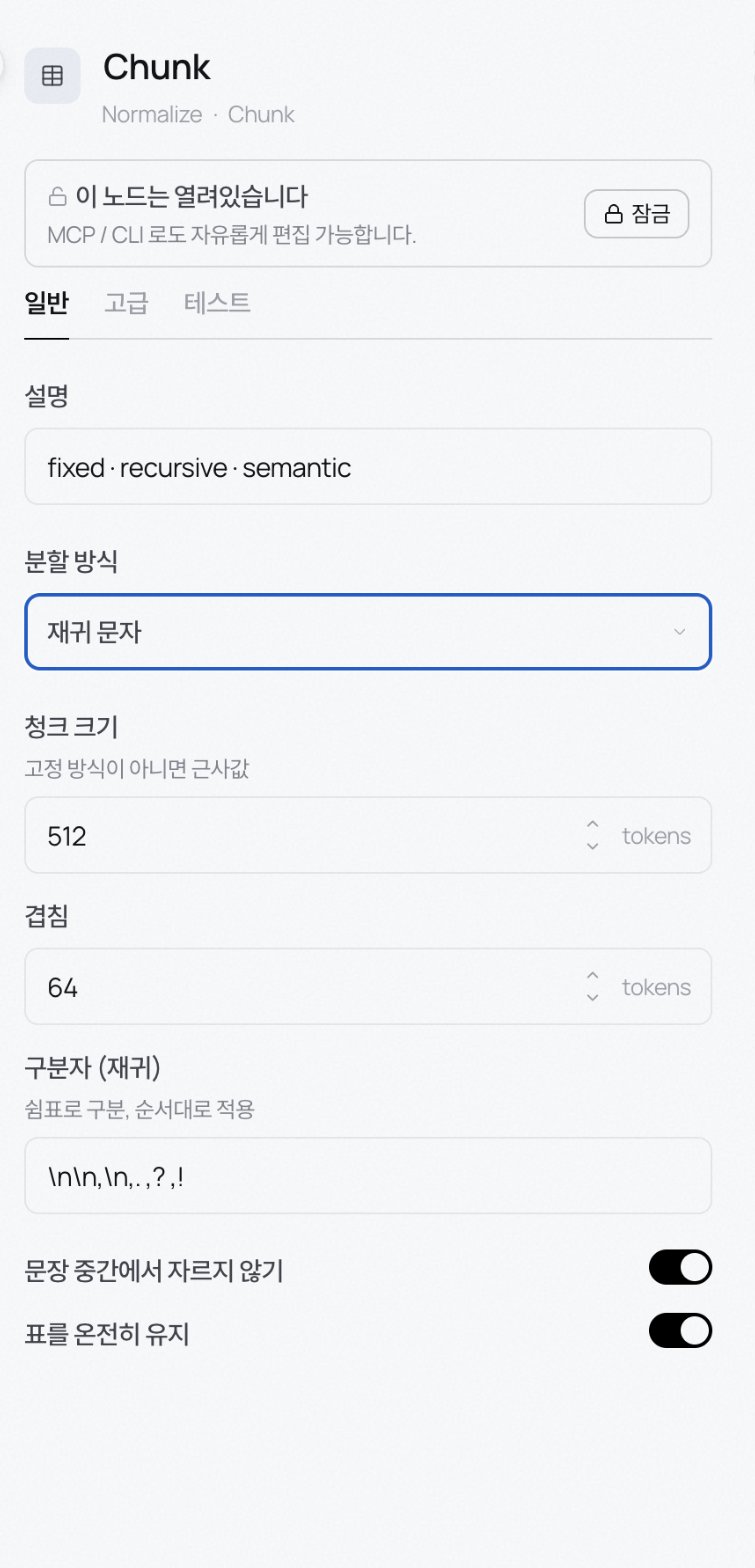
The rest of the settings:
- Chunk size: default 512 tokens. Approximate for non-fixed methods.
- Overlap: default 64 tokens. The tail of one chunk reappears at the head of the next so a query landing on a boundary still recalls.
- Separators (recursive): default
\n\n,\n,.,?,!. Comma-separated and applied in order. - Semantic break threshold: default 0.7. Semantic method only. Lower = larger chunks; higher = finer splits.
- Don’t cut mid-sentence: on by default.
- Keep tables intact: on by default. Tables won’t be split at a chunk boundary.
Chunk typing profile
Tag each chunk with a type (concept, definition, example, …) at ingest so retrieval can aim at the type it needs. Pick a workspace profile from the Chunk typing profile dropdown; leaving it blank uses the workspace default. The dropdown lets you create a new profile with + New profile or edit an existing one inline. You do not need to open Settings to define a domain-specific type set.Transform nodes
Clause split
Splits Korean insurance policies and legal documents into 조 (Article) and 항 (Clause). For Korean policy PDFs, set Granularity to Article so sub-markers stay grouped inside the article. Min/max clause tokens can merge too-short clauses; you can tag references to defined terms too. Like Chunk, Clause split exposes an inline Chunk typing profile picker so each clause is tagged with a type as it’s created.Translate
Translates an item into another language. Source language auto-detects by default; the model comes from Settings → External LLMs. Blank uses the workspace default.Summarize
Adds a summary to each item. Configure style (LLM rewrite), max length, and model.Markdown
Cleans OCR output into markdown. Recognises Korean legal headings (제N조 · 제N장), Article N, and outline numbering (1. / 1.1) as headings; preserves tables and lists; rejoins words split by end-of-line hyphens.Table fix
Repairs broken tables in PDFs by stitching split rows back together and separating cells that were joined. Deterministic stitch + split always runs. If the heuristics leave a table ambiguous, pick an LLM refine model (optional) to reconstruct it. A vision/VLM model handles messy tables best. Leave the model blank to stay deterministic-only (no tokens).Form fields
Pulls key-value pairs from forms (like application forms) with confidence scores. Uses a layout-aware OCR engine and can infer field names from position.Structured
Unifies HTML, Markdown, JSON, CSV into a single shape. Turn Preserve structure off to flatten to plain text; on keeps the tree.Sub-pipeline
Reference another refinery as if it were a node. Extract a recurring flow into its own refinery and call it from here. Multi-select the nodes on the canvas and use “Group as sub-pipeline” (Cmd+Shift+G) to lift them into a fresh refinery and drop a reference node in their place.
Sub-pipeline references are currently placeholders. The child refinery runs from its own tab. Use the Open sub-pipeline button in the inspector to jump in.
Branching and merging live on edges, not on nodes
There’s no dedicated Branch or Merge node. Handle both from the inspector and the wiring:- Branch: in the node inspector’s Advanced → Flow control section, set
dispatch=routedand one downstream branch fires based on a routing key. Label each outgoing edge with the condition that should send data along it. - Merge: a node with multiple incoming edges automatically combines the payloads at runtime.