

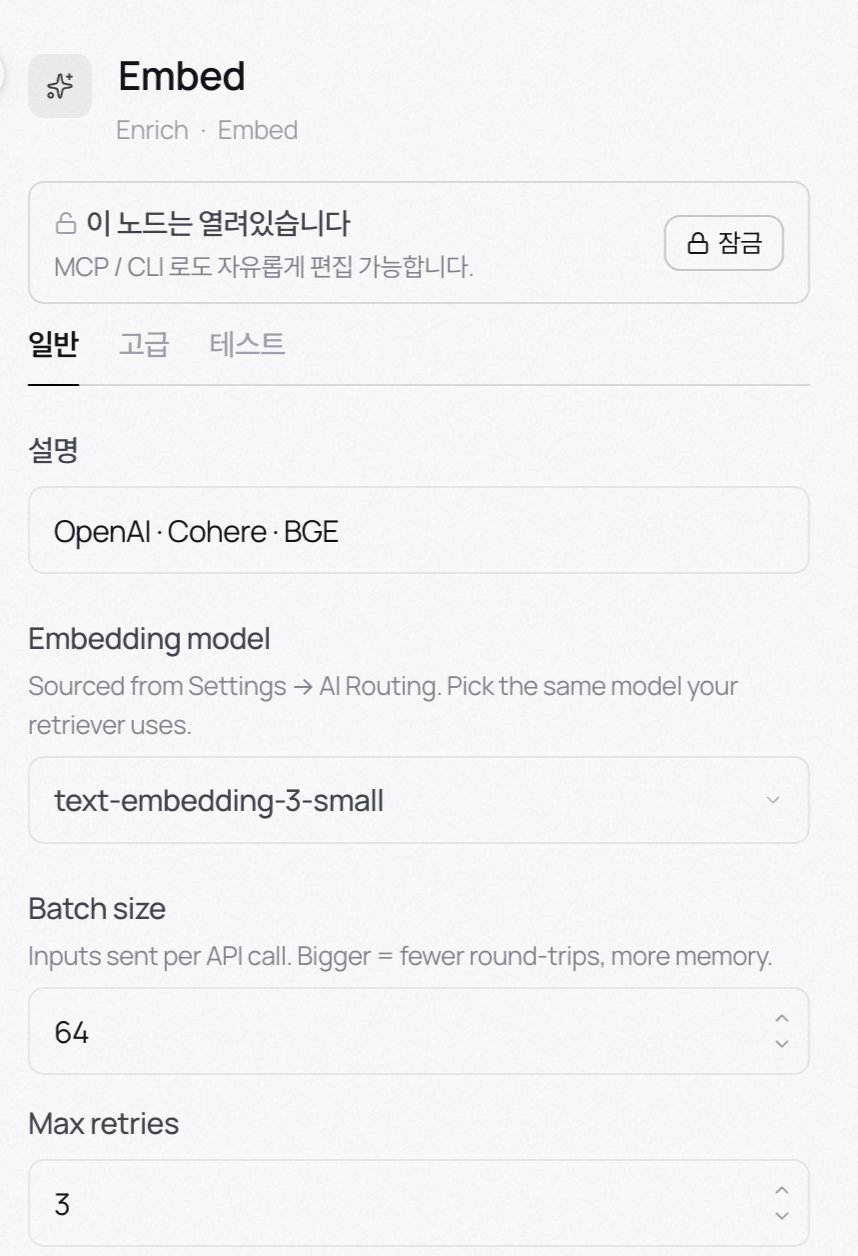
Embed
Turn chunk text into a vector. Embedding makes semantic search work by placing more relevant vectors closer together in space.- Embedding model: pick from models registered under Settings → External LLMs. Use the same model retrieval uses. If they differ, similarity is meaningless.
- Batch size: default 64. Inputs per API call. Larger cuts round-trips but uses more memory.
- Max retries: default 3.
Contextual prep
Prepends a slice of document context to each chunk before embedding (Anthropic’s Contextual Retrieval). One inference call per chunk, so start with a small model.- Max context tokens: 50–100 recommended. Longer means richer context and larger embed input.
- Include doc title: prepend the document title to each chunk. Helps when documents get mixed.
- Use prompt caching: reuses the doc body across calls to cut cost significantly.
NER
Detects named entities and attaches them. Pick from PERSON, ORG, MONEY, DATE, GPE (location), PRODUCT, EVENT under Entity types. Scores below Min confidence are dropped. Great for lookup-style queries like “show me every chunk mentioning Acme Corp”.Classifier
Attaches one label per chunk. Pick a Kind (topic / sentiment / intent / risk) and list the labels. The LLM answers with exactly one. Scores below Min confidence are dropped. Labels land as chunk metadata (see tags).HTTP Lookup
Call an external API per record and attach the response JSON.- URL template:
{{record.<field>}}is substituted into the URL. Example:https://api.example.com/users/{{record.user_id}}. - Method: GET or POST.
- Auth: None · Bearer · Basic · OAuth2. Bearer takes a token or a
secrets://<ENV>reference. - Attach to field: the response lands at
record.<field>. - On failure: Attach null, Drop record, or Fail record.
- Cache TTL: reuse the same lookup. 0 disables caching.
DB Lookup
Fetch one row per record from a database. Postgres, MySQL, MariaDB. The inspector uses the same DB picker + SQL editor shell as Source · Database and Output · DB Upsert.- Database: pick an internal resource registered under Settings → Internal resources. DSN stays out of the refinery JSON.
- SQL: write the query using
{{record.<path>}}. Placeholders map to the engine’s bind parameters, and a side panel surfaces every binding the SQL references. Don’t use positional placeholders yourself. - Attach to field · On no match · Cache TTL: same as HTTP Lookup.
LLM Tagger
Attach labels defined by a prompt, per record.- Model: blank uses the workspace default.
- System prompt · user template: the template renders per record; reference values with
{{record.<field>}}. - Store field: the JSON key for the parsed label. Blank merges into the record’s top level.
- Max cost · Max tokens: spending caps.
Script
Run a short JavaScript or Python function per record to compute fields to attach.record.<field>.
Common
- Contextual prep, NER, Classifier and other LLM-backed nodes have a Test tab in the inspector for quick sample runs.
- Enrich nodes run in the order they’re wired. Fields added by an earlier node are available to later ones.
- LLM calls and embeddings are where cost accumulates. Start with a small model and cap it with the LLM Tagger’s max cost and max tokens.
- If a vertical profile (insurance, medical, SaaS) is turned on for the workspace, the palette shows extra domain nodes such as Clause tagger, Compliance, Risk scorer, ICD coder, CPT/HCPCS, LOINC mapper, RxNorm, Negation, Temporal norm, and Clinical sections.